


Handshake: Jobs & AI work
4.41.23K Reviews
App Specs
- Version
- 5.18.1
- Updated On
- License
- Free
- Downloads
- 1,000,000+
- Developer
- Handshake (Stryder Corp.)
- Categories
- Business
- Platform
- Android, iOS
Screenshots

 Analysis by AppCompare
I see Handshake as a career-search tool with a distinct audience: students and people early in their working lives who want opportunities connected to their education, not another endless feed of general job ads. That focus is its clearest strength, but it also shapes the limits of the experience. If you are still exploring what a first job could look like, the app can help you discover roles, internships, and employers in one place. If you already have a long professional history and want a broad search across every industry, a general job board may be a better first stop.
That niche matters in the day-to-day. Early-career applicants often have little experience to use as a filter, so a search built around interests, skills, and school connections can be easier to approach than a giant catalogue aimed at everyone. Handshake is free, and the app is developed by Handshake (Stryder Corp.). Its average rating is 4.4 from around 8,600 ratings, with roughly 1.1 thousand written reviews and over a million installs. Those figures suggest that it has found an audience, though they do not replace the more useful question: does its career-focused approach fit your situation?
A focused starting point for early-career searches
The practical advantage is not simply seeing openings; it is having a place to organize a search while you are still learning how hiring works. A student balancing classes, a part-time job, and applications can use a focused app to check opportunities in short sessions instead of rebuilding a search from scratch each time. I would treat it as a discovery and planning aid, then read each listing carefully before deciding whether to apply.
That distinction is important because a recommendation is only a starting point. Keep your profile and preferences current, and use them to narrow what appears, but do not assume that every suggested position is a close match. A role can share a field or keyword with your interests while still differing in schedule, location, or requirements. I find the best approach is to use recommendations to surface possibilities, then make the final decision against the actual listing and your own priorities.
Where it fits beside other job-search tools
Compared with broad job boards, Handshake’s value is its student-and-graduate orientation and the possibility of finding career resources and school-connected opportunities alongside listings. Compared with a professional networking platform such as LinkedIn, its emphasis is more directly on entering the workforce than on maintaining a broad professional presence. I would not make either comparison an either-or choice: use Handshake to explore early-career openings and campus-related activity, then turn to wider platforms when you need more coverage, established professional contacts, or a different kind of role.
There is a trade-off in that focus. It can make the app feel more relevant to someone beginning a career, but it may be less useful if your search is not connected to student or graduate opportunities. Access to school-linked resources can also depend on your relationship with a university, so it is sensible to check what is available to you after signing in rather than assuming every user sees the same opportunities. That is not a reason to rule it out; it is a reason to regard the actual opportunities in your account as the test.
Make the search more useful, not just busier
One small but useful habit is to separate browsing from applying. Save a shortlist outside the moment of scrolling, then revisit each role with a clear checklist: does the work interest you, do you meet the stated requirements, and can you explain why you want it? This prevents a stream of notifications from turning into rushed applications. It also helps you notice patterns in the roles that appeal to you, which can guide what skills or experience to build next.
Worth Reading Before You Choose

EA SPORTS FC Mobile 26 Is a Bigger Football Game, but It Takes Time

Flipboard Shows What News Apps Must Do Beyond the Feed

Switching to Android Auto Means Rethinking Your Driving Routine

Google Calendar Makes a Crowded Week Easier to Manage

Ludo King Makes the Most of the Minutes Between Plans

Baby Panda World Brings Quick Play to Modern Phones, but Its Game Library Feels Busy
For a realistic example, imagine a student with a packed week who wants a summer internship but has not settled on one exact job title. A quick check can reveal possibilities to investigate; later, the student can compare responsibilities, location, and application details when there is time to focus. The app can make discovery less fragmented, but it cannot decide whether an opportunity is right or write a thoughtful application for you. I would use it to create a manageable next step, not as a substitute for research or careful follow-through.
It is also worth deciding how you want to handle alerts. Timely notices can help you see a fresh opening, but frequent checking can become distracting, especially during exams or a busy work week. I would keep notifications useful rather than letting every prompt interrupt the day, and set aside a regular time to review listings. A calmer routine is more likely to produce considered applications than reacting to every new item as if it were urgent.
Who is likely to get the most from it
I would recommend Handshake first to current students and recent graduates who want to explore internships, entry-level roles, and career guidance while building confidence with the application process. It may also help someone who is unsure what to search for, because browsing roles can expose them to job titles and paths they had not considered. The app is rated for Everyone, but the strongest practical fit is still people at the beginning of a career rather than every person looking for work.
On the other hand, I would not rely on it alone if you are changing careers after years in another field, seeking highly specialized senior work, or need a search that covers a wide range of employers and professional communities. A general job board or industry-specific resource may give you a more suitable pool. Even for students, an account should be only one part of a search: prepare a resume, check employer details, and follow application instructions outside the app when needed.
What to expect before you install
The app is free and is currently at version 5.8.2; it supports Android 7.0 and later. Its content rating is Everyone. Those basics make it easy to try if your device is compatible, but the more important expectation is that usefulness depends on what you are looking for and what opportunities are available to your account. A polished starting point cannot guarantee that a particular opening will suit your schedule, qualifications, or location.
If you are wondering whether it replaces a university career office, I would say no: it can help you find and manage opportunities, while a human adviser can discuss your circumstances in a more personal way. If you are asking whether it is useful without a firm career plan, it can still be a reasonable discovery tool, provided you treat suggestions as leads rather than instructions. And if you want a broad search, pair it with a general platform instead of expecting one app to cover every stage and kind of work.
The most useful way to judge it is to try a focused search and see whether the results and resources help you take a concrete next step. If you find relevant roles, use the app to keep your search organized; if you repeatedly see little that matches your goals, broaden your search elsewhere rather than spending time scrolling out of habit. That approach makes the tool serve your plans instead of letting a feed define them.
Have you ever caught yourself scrolling endlessly through job listings, feeling like you’re in a never-ending maze of opportunities that don’t quite fit? Well, that’s where Handshake Jobs & New Careers steps in to save the day. This nifty app is like having a career coach right in your pocket, specifically tailored for students and recent grads eager to kickstart their professional journey.
Getting Started with Handshake
First things first, let’s talk about the user experience. Downloading and setting up Handshake Jobs & New Careers is a breeze. You can sign up using your university credentials, which is super convenient since it automatically aligns your profile with your school’s network and resources. The interface is clean and intuitive, making navigation quite straightforward even if you’re not tech-savvy.
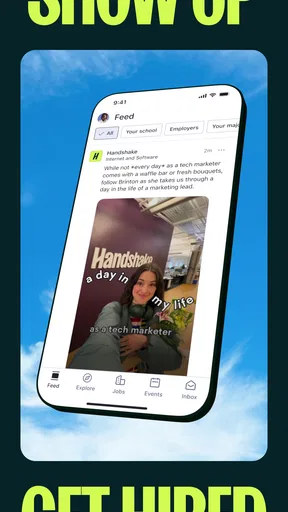
Once logged in, you’re greeted with a dashboard that’s designed to be your job-hunting headquarters. From here, you can explore job listings, internships, and even connect with employers directly. It’s like LinkedIn’s cool younger sibling that’s focused on making your transition from campus to career as smooth as possible.
Features That Make a Difference
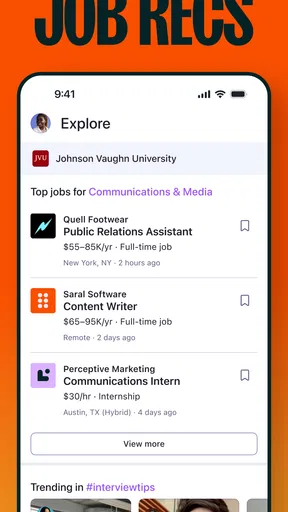
One of the standout features of Handshake is its personalized job recommendations. The app uses your profile and preferences to suggest positions that align with your skills and interests. No more sifting through irrelevant job postings – Handshake does the heavy lifting for you.
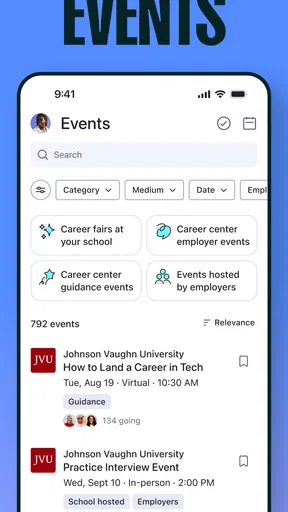
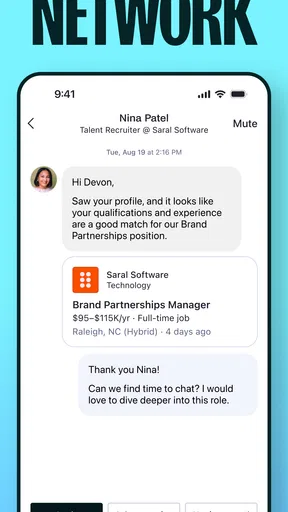
The networking aspect is also noteworthy. You can follow companies, attend virtual events, and even message recruiters directly within the app. This feature is a game-changer for those who dread traditional networking events. Plus, the app’s partnership with numerous universities means you’re always in the loop about exclusive campus recruitment events.
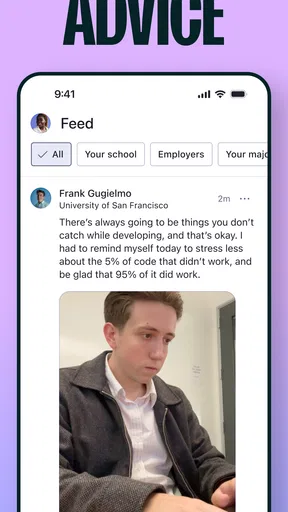
Another cool feature is the career advice section. Handshake offers a plethora of resources ranging from resume building tips to interview preparation guides. Whether you’re a newbie in the job market or looking to refine your professional skills, this section is a treasure trove of information.
My Experience and Thoughts
Using Handshake felt like having a personal career assistant. The app’s ability to connect me with potential employers in my field of interest was particularly impressive. I loved how I could easily tailor my job search based on location, industry, and even company size. The notifications for new job postings were timely, ensuring I never missed out on opportunities.
The app’s user-friendly design made it easy to track my job applications and see which ones were still open. It’s a small detail, but knowing the status of your applications without having to dig through your email is a huge stress reliever.
It’s also worth mentioning how Handshake fosters a sense of community. The ability to see reviews and insights from fellow students about employers was invaluable. It gave me a realistic perspective on what to expect from potential workplaces.
Final Thoughts
In the crowded world of job search apps, Handshake Jobs & New Careers stands out by focusing on the unique needs of students and recent graduates. Its blend of job search functionality, networking opportunities, and career advice makes it a comprehensive tool for anyone looking to jumpstart their career.
If you’re a student or a fresh grad feeling overwhelmed by the job market, give Handshake a try. It’s more than just an app; it’s a stepping stone to your professional future. So go ahead, download it, and take your first steps towards landing that dream job.
Pros
- User-friendly interface for easy navigation.
- Vast network of employers and opportunities.
- Customizable job alerts and notifications.
- Seamless integration with university career centers.
- Insightful company reviews and ratings.
Cons
- Limited to student and recent graduate users.
- Certain features require university verification.
- Occasional app crashes and slow updates.
- Notifications can become overwhelming.
- Lacks advanced search filters.
FAQs for Handshake: Jobs & AI work
What is Handshake Jobs & New Careers, and who is it for?
Handshake Jobs & New Careers is a platform designed to connect students and recent graduates with potential employers. It serves as a career-building tool, offering job listings, internship opportunities, and networking events. Ideal for college students looking to start their careers, Handshake bridges the gap between academia and the professional world.
How does Handshake ensure job listings are relevant and legitimate?
Handshake partners with thousands of universities and trusted employers to provide verified job listings. Each listing is reviewed for authenticity, ensuring students access legitimate opportunities. The platform also utilizes algorithms to match users with positions that align with their skills and career interests, enhancing relevance and reliability.
Is Handshake available for both Android and iOS devices?
Yes, Handshake is available for download on both Android and iOS devices. The app offers a user-friendly interface on both platforms, providing seamless access to job searches, event registrations, and networking opportunities. Users can stay updated on career opportunities anytime, anywhere.
Does Handshake offer any additional features besides job listings?
Beyond job listings, Handshake offers a range of features including virtual career fairs, employer events, and workshops. Users can engage in networking opportunities, receive career advice, and access a personalized feed of job recommendations. These features make it a comprehensive career-building tool for students and graduates.
Are there any costs associated with using Handshake?
Handshake is free for students and recent graduates. The platform's mission is to democratize career opportunities, making it accessible to all users without a fee. Universities and employers may have their own arrangements with Handshake, but individual users can enjoy the app's full functionality at no cost.


